 AI Tools Field Guide
What not to paste into an AI tool
Whatever you paste into a chatbot leaves your machine and sits on the vendor's servers. A public account and a work account your organization approved handle that text differently, and some things belong in neither.
The one-screen table
| Public consumer tools (free or personal ChatGPT, Gemini, Grok, Claude) | Your organization's approved work tool, if it has one | Never anywhere | |
|---|---|---|---|
| What may go there | Material you would be comfortable seeing on a public web page | What your organization's rules allow for that tool | |
| Typical examples | A published policy, a public news story, your own draft with the names taken out | Internal drafts, meeting notes, documents your rules permit | Passwords, API keys, classified material |
| Keep out | Personal details, health information, client or customer data, anything marked sensitive, anything under a contract or NDA | Whatever your rules list as barred, often health data and customer records | Anything a law or your security office says stays on a specific system |
When a row does not settle your case, the answer is the same: ask your IT or security office before you paste, not after.
What a work or enterprise tier changes
The vendors sell business versions under names like Business, Team, Enterprise and Workspace. The chat window looks the same. What changes is the contract behind it.
- Your text is not used for trainingBy default the business tiers do not train the vendor's models on what you type. The consumer versions may, unless you turn a setting off.
- An administrator sets the rulesYour organization decides which features are on, who can share with whom, how long chats are kept, and which connectors may reach your files.
- It is still somebody else's computerA business contract limits what the vendor does with your text. It does not make the tool the right home for data your rules keep on a specific system.
Each vendor states its own terms. These are the pages to read, checked on 25 September 2026:
| Vendor | Consumer version | Business version |
|---|---|---|
| Google Gemini | With Keep Activity on, chats help train Google's models, and a sample is read by human reviewers. Google asks you not to enter anything confidential (Gemini Apps privacy hub) | Work and school accounts: not reviewed by people or used for training outside your organization without permission (Workspace privacy hub) |
| OpenAI ChatGPT | Chats can be used for training unless you turn it off in Data Controls | Business, Enterprise and the API: no training on your data by default (OpenAI enterprise privacy) |
| Anthropic Claude | Chats are used for training only if you allow it, and Incognito chats never are | Claude for Work and the API: no training on your inputs or outputs by default (Anthropic privacy center) |
| xAI Grok | Conversations may be used for training unless you opt out | Grok Business, Enterprise and the API: not used for training (xAI FAQ) |
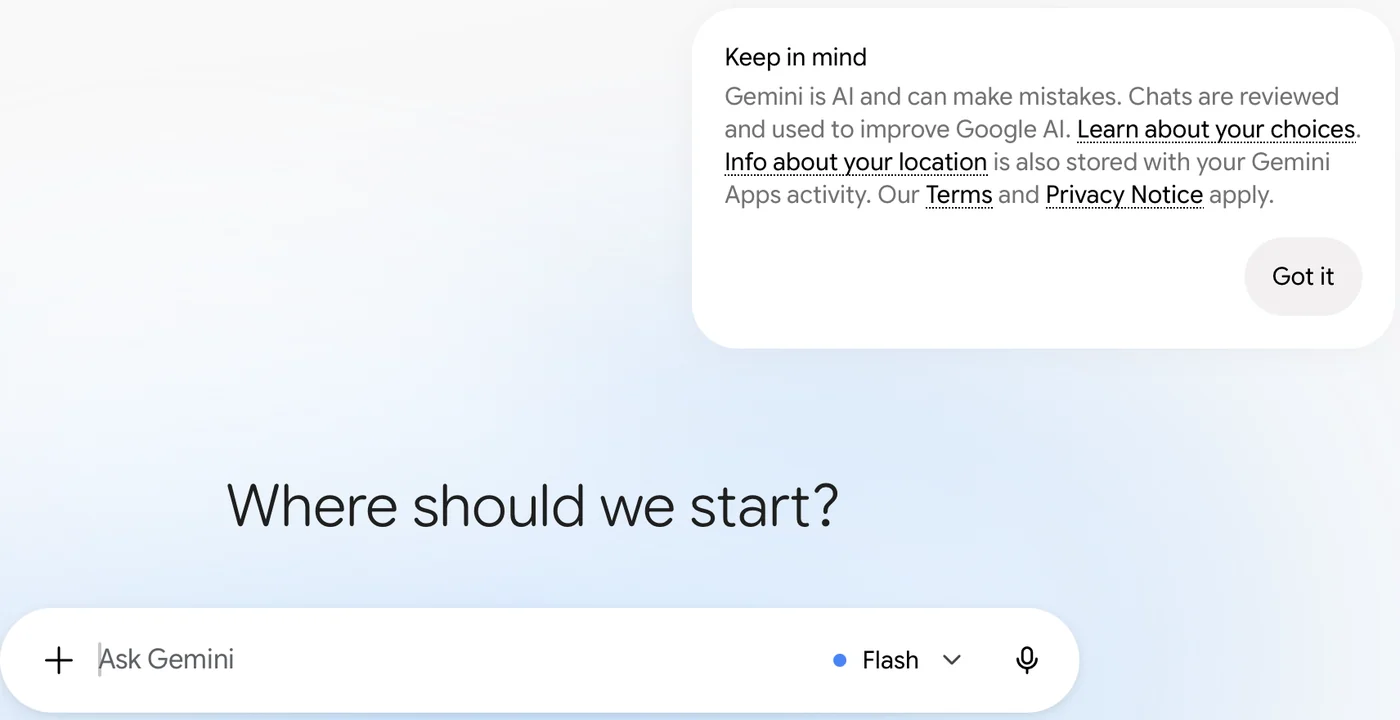
Screenshot by the author, 25 September 2026.
Two things to take from that table. First, "not used for training" is not "not stored": the text still sits on the vendor's servers for as long as the retention setting says. Second, a personal Plus or Pro subscription is still a consumer account. Paying for it does not make it a work tool.
The rule of thumb
If you would not put it in an email to a stranger, do not put it in a public AI tool. In practice that keeps out:
- Personal data. Names with home addresses, phone numbers, dates of birth, ID numbers, rosters, recall lists, performance notes about a named person.
- Health information. Anything about a person's medical condition, appointments or fitness status.
- Credentials. Passwords, API keys, access tokens, one-time codes, the contents of a config file. A key pasted into a chat counts as a leaked key; rotate it.
- Anything marked sensitive. If the document carries a marking, a distribution statement or a "not for release" line, the marking decides where it goes, not the chatbot.
- Other people's data. Client files, customer records, a partner's pricing, anything you received under a contract or NDA.
The fix is usually easy. Take the names out, replace them with Person A and Person B, round the numbers, and paste what is left. The model rarely needs the real details to draft the letter or tidy the table.
Ask before you paste
Your organization's rules sit on top of anything on this page. Many organizations have an approved tool and a short list of what may go into it. Start there. If nobody has written it down, ask your IT or security office before you upload, and keep the answer in writing.
Vendor facts checked ; re-verify before relying on them.