 AI Tools Field Guide
Which tool for which job
All four tools chat, read files and search the web, so the choice rarely makes or breaks a job. Each one still has a few things it does better than the rest, and each lets you pick between a fast model and a careful one; open the one below that matches the job, and the setting inside it that matches how much the job needs to be right.

The four tools
- ChatGPTChat with files; Projects that keep a job's files, instructions and chats together; plugins that bundle saved skills with app connections, replacing custom GPTs; Scheduled tasks; Codex, a coding agent.
- GeminiChat with files; Deep Research for a long sourced report; Canvas for editing a draft side by side; Gems, saved helpers with their own instructions and files.
- GrokChat with files; Fast and Expert modes; projects; skills that produce Word, PowerPoint, Excel and PDF files; automations that run a prompt on a schedule.
- ClaudeChat with files; Projects with their own files and instructions; Artifacts, documents and small apps that open beside the chat; Skills; Claude Code, a coding agent.
What each is known for
Features spread quickly between vendors, so treat this as where each one is strongest in September 2026, not a list of exclusives.
| Tool | Feature | What it gives you |
|---|---|---|
| Gemini | Deep Research | A plan, a long search and a written report with its sources, in minutes (Google) |
| Gemini | Canvas | A draft or a code file beside the chat that Gemini edits in place (Google) |
| Gemini | Gems | A saved helper with detailed instructions and files, for a job you repeat (Google) |
| ChatGPT | Projects | One job's files, instructions and chats in one place (OpenAI) |
| ChatGPT | Plugins | Skills (saved instructions) plus connections to Gmail, Drive, GitHub and more; they are replacing custom GPTs (GPTs, plugins and what replaces them) |
| ChatGPT | Codex | A coding agent in the cloud, a terminal, your editor or ChatGPT itself (OpenAI) |
| Grok | Skills | Packaged instructions and scripts Grok calls on when needed, including ones that write .docx, .pptx, .xlsx and PDF files (xAI) |
| Grok | Automations | A prompt that runs itself on a schedule, or when a matching email arrives, and keeps every run (xAI) |
| Claude | Projects | A workspace with its own knowledge files, instructions and chats (Anthropic) |
| Claude | Artifacts | A document, chart or small app that opens beside the chat and can be edited and shared (Anthropic) |
| Claude | Skills | Folders of instructions, scripts and resources that Claude loads only when a task calls for them (Anthropic) |
| Claude | Claude Code | A coding agent for the terminal, your editor and the desktop app (Anthropic) |
The models inside each
Every tool lets you pick which of its models answers. The names differ and change every few months; the idea stays the same everywhere: a fast tier for everyday drafting and a slower, more careful tier for hard reasoning.
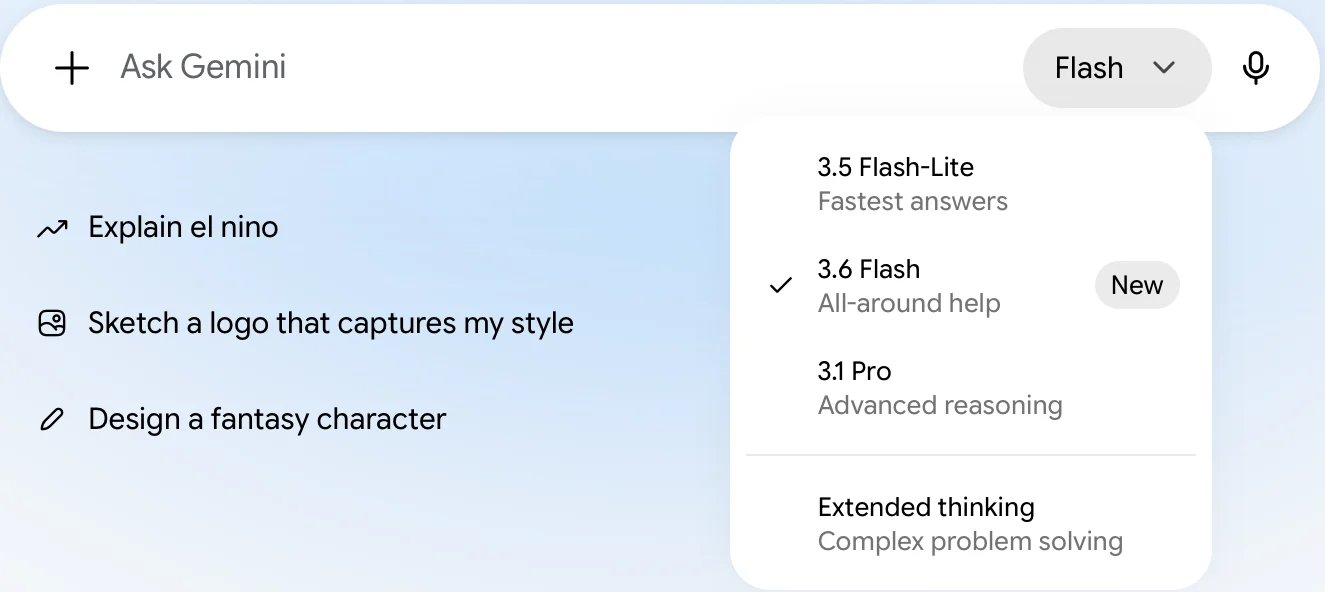
Screenshot by the author, 25 September 2026.
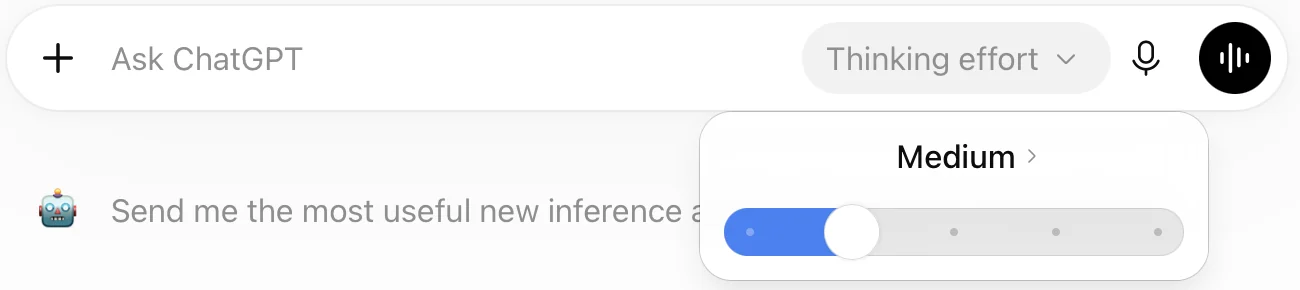
Screenshot by the author, 25 September 2026.
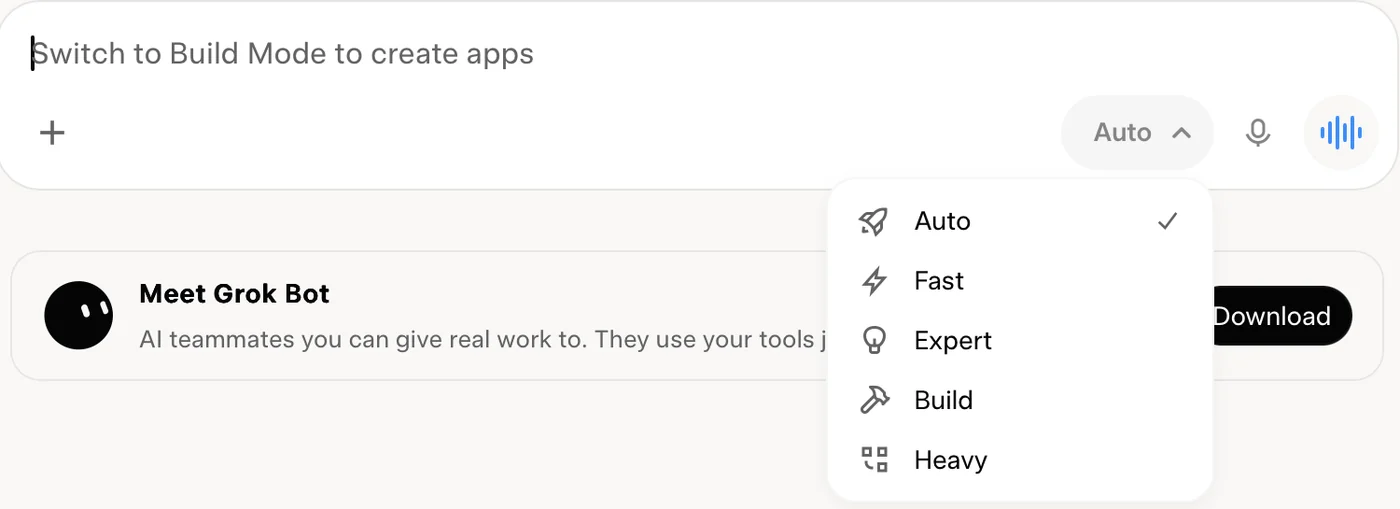
Screenshot by the author, 25 September 2026.
| Tool | What the picker shows | Fast end | Careful end |
|---|---|---|---|
| Gemini | Named models plus a thinking switch | Flash-Lite, Flash | 3.1 Pro, Extended thinking |
| ChatGPT | A thinking-effort slider | Instant, or a low effort | Thinking at a higher effort; Pro on higher plans |
| Grok | Modes with plain names | Fast | Expert, Heavy |
Checked September 2026. Your plan decides which of these you see, and the names will have moved on by the time you read this.
| Tool | Fast tier | Careful tier | Source |
|---|---|---|---|
| ChatGPT | Instant | Thinking, and Pro on higher plans | OpenAI help |
| Gemini | Flash-Lite and Flash | 3.1 Pro, and Extended thinking | Google models |
| Grok | Fast | Expert | xAI models |
| Claude | Sonnet (Haiku is faster still) | Opus | Anthropic models |
Start on the fast tier and switch to the careful one when quality matters more than speed. Do not run everything on the careful tier: it is slower, and on most plans it has a lower usage limit.
Pick the thinking level
Most people never touch the picker, and Auto often answers with the fast tier because most questions do not need more. That is fine for a rewording or a summary. It is the wrong setting for the jobs where you would notice a mistake: a comparison you will brief, a policy question, a long document with a fact buried on page 60, arithmetic on a table, or anything where the first answer looked shallow.
| The job | Tier | Why |
|---|---|---|
| Reword, shorten, format, quick lookup | Fast | Seconds, and good enough |
| Summarize or extract from one document | Either; fast first | Switch up if it misses items you can see |
| Compare two documents, find what changed | Careful | Multi-step reasoning is what the slow tier buys |
| Answer a policy question with citations | Careful, with the source attached | It reads more before it answers |
| Plan, weigh options, draft something you will sign | Careful | Slower, more thorough, still yours to check |
If an answer looks thin, do not argue with it: open the picker, choose the careful tier, and ask again with the same prompt. A slower mode gives you a more careful draft. It verifies nothing, so Checking output is still the last step.
Which one for the job
| You want to… | Open | Why |
|---|---|---|
| Draft a memo, letter or package from your material | Any of the four, inside a project | Files plus a project keep the format and the sources together (Projects) |
| Review or summarize a long document | Any of the four | All four read a PDF well; use the one whose project already holds your files |
| Research and compare options with sources | Gemini Deep Research, or the research mode in ChatGPT or Claude | They show their sources and write a report; check the sources yourself |
| Edit a draft with the model, side by side | Gemini Canvas, or a Claude artifact | The draft stays on screen and changes in place instead of being re-pasted |
| Get an actual Word, PowerPoint or Excel file back | Grok with a skill; Claude and ChatGPT can also create files on many plans | Budget a few minutes and read the result before you send it |
| Build a helper your team reruns on new documents | A ChatGPT plugin skill, a Gem or a Claude project | Saved instructions and files, reused by anyone you share it with (Custom GPTs and agents) |
| Run the same prompt every Monday | Grok Automations or ChatGPT Scheduled | It runs unattended and keeps each result (Automations) |
| Write or fix code | Codex or Claude Code | Agents that read your files and run the code, not only talk about it |
Whichever you open, the data rules do not change: nothing sensitive in a public account, and a work account only as your organization's rules allow. What not to paste has the table.
Vendor facts checked ; re-verify before relying on them.